Tuesday, November 30, 2010
Saturday, November 27, 2010
Moodle 2.0 - checking out what's new!
Moodle 2.0 was officially launched on 24th November 2010. If you are interested in checking out how Moodle 2.0 differs from earlier versions of Moodle, check out the official release notes here or link to specific notes below!
Taking the Core features of Google Apps to the next level
- a free online professional development seminar!
Date and time: 8 December 2010 13:30, New Zealand Daylight Time (Wellington, GMT+13:00)
Program: Google Apps for Education Professional Development
Duration: 1 hour
Description: Taking the Core features of Google Apps to the next level.
Skill level: Intermediate
Lead by Michael Wacker, Google Apps for Education Certified Trainer and Google Certified Teacher
We will explore 5 "killer" features to be used in a K-12 setting in 5 Google tools. Take your Google astuteness to the next level. Join us to learn tips and tricks on Search, Documents, Forms/Spreadsheets, Sites, and Calendar.
Click to register!
Click to access a handy one page handout on 'Introduction to Facebook Groups for teachers - how to create one and things to consider.
Or you can check out the slideshow tutorial here
Click to access a handy one page handout on 'Introduction to Facebook Groups for teachers - how to create one and things to consider.
Or you can check out the slideshow tutorial here
Saturday, November 20, 2010
Learning Over Lunch - Introduction to Facebook groups for teachers
In this workshop we looked at Facebook Groups - how to create them and what you need to consider as teacher.
View more presentations from Claire Amos.
Possible uses
Possible uses
- Online discussion
- Provide a space for students to ask each other for help
- Post useful links, resources
- Email reminders to students with new Facegroup email functionality!
Sunday, November 14, 2010
Weekly e-learning Update - Handy Handouts, Google Docs, Google Forms, Blogger and more
Welcoming laptops into the classroom
Check out the link above for strategies for 'Welcoming Laptops into the Classroom'.
Learning Over Lunch
This week’s Learning Over Lunch session will take place on Thursday Topic: 'Setting up a Group on Facebook' aka How to use Facebook without being "friends" with your students (postponed date from last week)
Top Tech Tips - a review of resources available on Teaching and e-learning!
Handy Handout for Google forms
Click the link above to access a handy one page handout for staff and students about creating and sharing a document on Google forms
Click the link above to access an introductory presentation on how to create, share and view the resoults of a Google form
Click the link above to access a handy one page handout for staff and students about creating and sharing a document on Google Docs
Click the link above to access an introductory presentation on how to create, upload and share a Google document
An introduction to Blogger (how to create one) and some ideas and research looking at how you could use blogging to support student writing.
Wednesday, November 10, 2010
PPTA updates
Hi everyone
This is mostly for PPTA members - apologies.
Following last night's very late decision to call off industrial action, I investigated whether PPTA have facility to contact members directly -instead of us waiting for Nowell to pass on messages.
I successfully logged in to the PPTA website and subscribed to the stca email alerts.
These are now pushed to my iPhone so I'm slightly more connected to what's going on. I also follow @pptaweb on twitter - but they don't publicise anything via twitter.
Steve
This is mostly for PPTA members - apologies.
Following last night's very late decision to call off industrial action, I investigated whether PPTA have facility to contact members directly -instead of us waiting for Nowell to pass on messages.
I successfully logged in to the PPTA website and subscribed to the stca email alerts.
These are now pushed to my iPhone so I'm slightly more connected to what's going on. I also follow @pptaweb on twitter - but they don't publicise anything via twitter.
Steve
Handy Handout - Introduction to Google Forms
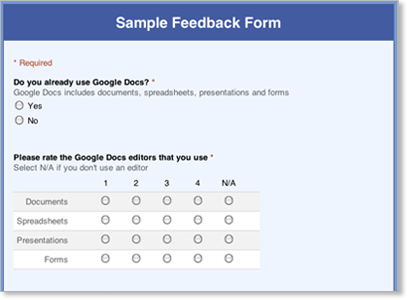
Click to access a handy one page handout on 'Introduction to Google Docs - how to create upload and share a document.
Or you can check out the slideshow tutorial
Or you can check out the slideshow tutorial
Saturday, November 6, 2010
Learning Over Lunch
Last week’s session was on ‘Introduction to creating a quiz or survey on Google Docs’. Check out the online version .
This week’s Learning Over Lunch session will be available online Thursday.
Topic: 'Setting up a Group on Facebook' aka How to use Facebook without being "friends" with your students
Professional Viewing Recommendations
Teaching Science to 21st Century Learners (lots here for all curriculum areas)
This presentation demonstrates how web2.0 tools can be used in the science class to enhance learning, celebrate achievements and encourage collaboration. It includes video of student interviews, examples of student work and screencasts showing how the tools can be used. Viewers will gain a ‘digital toolbox’ to encourage 21st century learners to participate, communicate and create.
The Classroom Social Network: It’s not just Fun, It’s Fundamental to Modern Learning
Social Networking has been around for the past 7 years give or take, but until recently hasn’t had a large presence in the classroom. I would like to show you the benefit of using various types of social networking in your own classroom to increase your student’s engagement in the classroom and give you tools to authentically assess their understanding via discussion boards and posting of videos/photos. (Looks at strategies for using Facebook, Twitter and Weebly)
Top Tech Tips
Click the link above to access a handy one page handout for staff and students about creating and sharing a document on Google Docs
Welcoming laptops into the classroom
Check out the link above for strategies for 'Welcoming Laptops into the Classroom'.
Last week’s session was on ‘Introduction to creating a quiz or survey on Google Docs’. Check out the online version .
This week’s Learning Over Lunch session will be available online Thursday.
Topic: 'Setting up a Group on Facebook' aka How to use Facebook without being "friends" with your students
Professional Viewing Recommendations
Teaching Science to 21st Century Learners (lots here for all curriculum areas)
This presentation demonstrates how web2.0 tools can be used in the science class to enhance learning, celebrate achievements and encourage collaboration. It includes video of student interviews, examples of student work and screencasts showing how the tools can be used. Viewers will gain a ‘digital toolbox’ to encourage 21st century learners to participate, communicate and create.
The Classroom Social Network: It’s not just Fun, It’s Fundamental to Modern Learning
Social Networking has been around for the past 7 years give or take, but until recently hasn’t had a large presence in the classroom. I would like to show you the benefit of using various types of social networking in your own classroom to increase your student’s engagement in the classroom and give you tools to authentically assess their understanding via discussion boards and posting of videos/photos. (Looks at strategies for using Facebook, Twitter and Weebly)
Top Tech Tips
Click the link above to access a handy one page handout for staff and students about creating and sharing a document on Google Docs
Welcoming laptops into the classroom
Check out the link above for strategies for 'Welcoming Laptops into the Classroom'.
Tuesday, November 2, 2010
The aim of this workshop is to introduce teachers to Google forms - how to create one, share it, view the responses and consider some uses in the classroom.
Below is a handy Youtube tutorial that also introduces Google forms!
Possible uses in the classroom
View more presentations from Claire Amos.
Below is a handy Youtube tutorial that also introduces Google forms!
Possible uses in the classroom
Google forms are a quick, easy and highly effecient ways to do any of the following:
- Gathering'Know your learner' type information
- Quizzes
- Questionnaires
- Student surveys
- Gathering student voice
- Pre-testing
- Feedback
- Evaluation of lessons and/units
- Spelling tests
Subscribe to: Posts (Atom)